
Or the title could be: How to Get Free Books on Amazon… hum… maybe… I should have used: My Way of Saving Money on Amazon. Anyways, since you are here, just keep reading and maybe my method will work for you, or maybe you can help me save some more money telling me your method… The more we save, the more we can spend on books.
Important: I don’t buy e-books (digital versions). I only buy physical books that I can hold and turn the pages (yes, old school all the way). I never tested this method with digital goods, so it may not work or help.
Many people just don’t care about paying full price at Amazon. However, for those that don’t like full price (like me), I have a suggestion. You need to have patience and sometimes luck, but at the end you will always save some $$$.
The Method
First, put all the books you want into your cart. Just put them there. Don’t think about the price. Just be sure to only add books “Sold by Amazon”. You will understand why later. I always keep my cart full of books all the time. Since you are not buying them right now, put them all on your “saved for later” list. This will keep them in your cart, but they will not be added to the checkout step… because you DON’T want to buy them just now (patience my young Padawan).
Second, now go to the first book on your list and copy its link from the Amazon website. If you are doing this on your browser, just copy the link on your navigation bar. If you are on your Amz app, just click the little share symbol and chose the option to copy url (or link if you prefer). Now that you have the link copied, visit the following site: https://camelcamelcamel.com (from now on “CCC”). This site will help you save money.
Paste the copied url on CCC’s search field on top named “Find Amazon Products”. Click and wait for the “magic” to happen. CCC will show you the book’s price history. Now you can easily see if the current price Amz is offering you is a good deal or is just the normal boring full price. The graphic provided by CCC is extremely helpful. It helps you to see patterns of drops in price, to check in which months the price normally drops or to know if the price never dropped at all. Bear in mind that many books, when released, have a big drop weeks or months after the release day. However, after that drop, they may never reach the lowest price ever again. CCC allows you to create an account and receive notifications… I don’t have an account with them and don’t plan to have one. I just don’t need, but feel free to have one.
Third, if the price of the book you want is below full price… what are you waiting for? Just get it! As I told you at the beginning, I just made you save $$$, you can thank me! But… if you are patient and you saw that the graphic showed a bigger drop a couple of months ago… maybe, if you wait a little longer (more patience), you can save even more $$$. Nevertheless, sometimes, the price goes up and stays there for months, even years. My The World of the Witcher Book took me almost two years to go down to the price I wanted to pay. Yes, I can be a very patient guy.
Finally, what I normally do is: I check all the prices and create a simple excel file with the lowest price, maximum price, etc. Then, when I am almost finishing a book, I go to my list and check my Amz saved list of books. If I find a book with a good price, I order it. Following this method, I am always reading a book and receiving new books without paying full price. At the end of the year, on average, you saved “a lot” of money. Or if you prefer, you got free books. Sometimes, I end up buying, for instance, book number 5 of a saga even though I didn’t read book number 3. Since I know I will read it anyways, why not have it at home, already waiting for me and for a good price?
Summary: this is a very simple method, but it helped me many times to avoid paying full price. This method will always help you to save some money. Maybe not a lot, but I bet you will be able to buy more books… or other products on Amz. For instance, last year I wanted to buy the last four books from the Witcher series. They all had a full price of cad$22.76. It would cost me cad$91.04. I followed my method and saw that a couple of months ago they were sold for cad$17.07 each. I waited and a couple of weeks before Blackfriday the four books dropped to the same $17.07. I didn’t think twice, got the four for $68.28.00. I saved $22.76. With the $22.76 I bought a fifth book. I could say I got a free book.
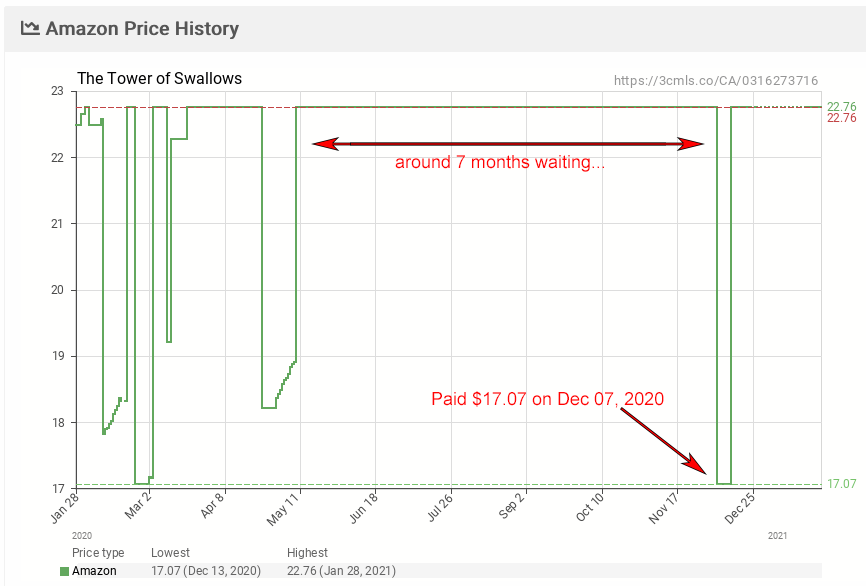
For me this method became like a game and since I buy way too many books per year, it helps me to buy even more for the same amount of money. Of course, if you only buy a couple or fewer books per year… just get the book right away and be happy!
Some final tips:
- Sometimes, the hardcover book is less expensive than the paperback one. Check all the formats before buying.
- This method will work better with books sold by Amz, because their algorithm is set to change the price all the time considering demand and other triggers. Moreover, sometimes third party stores on Amz don’t produce graphics on CCC (graphs are important!).
- Of course, this method also works for any product sold by Amz. I use this for everything.
- Blackfriday is not always the best time to buy on Amz, many products have their prices drop weeks before. They come back to full-price days before Blackfriday.
- Check the graphs for patterns, this is important.
- Some very low prices will never happen again, so don’t wait a lifetime to save $2.00. What I normally do is I to reduce the CCC graphs’ timeline to the last year’s prices. So I base my buy decision on the max drop over the last year.
- If you really, really want that book, just pay full price. A good book always worth the money. However, if it is a book you are not sure if it is a good one or if you still have many waiting on your shelve, just use that method to save some $$$.
- Saving is good, it helps you buy more books.
That’s all. I hope I’ll help you save some $$$ or help you get “free” books. If you have another simple method to save money on Amazon, just let me know. Thank you for reading! :0)